Designing for legal compliance is not the same as designing for human inclusion; the key difference is the user’s finite physical and cognitive energy.
- Minimum standards often create environments that are technically accessible but functionally exhausting, leading to exclusion.
- True accessibility minimizes the ‘cumulative friction’ of small obstacles to preserve a user’s ‘energy budget’ for participation, not just arrival.
Recommendation: Shift your design process from a compliance checklist to an analysis of the user’s ‘energy budget’ across every journey path.
For architects and city planners, the term “accessibility” often evokes a checklist of codes and standards: ramp slopes, door widths, and turning radii. We design to comply with the Americans with Disabilities Act (ADA) and similar regulations, believing that adherence equates to inclusion. But this is a critical misunderstanding. A space can be 100% compliant and still be profoundly exclusionary for a manual wheelchair user, a person with low vision, or anyone with a mobility impairment. The standards define a minimum, a pass/fail threshold that often ignores the most crucial factor in genuine participation: the human energy cost.
The conventional wisdom focuses on individual barriers. Can a wheelchair get up this ramp? Can a person get through this door? This article challenges that paradigm. We will argue that the true barrier to social inclusion is not a single obstacle, but the cumulative friction of a dozen “compliant” but poorly designed elements. Each of these adds a tax on a user’s finite energy budget—the physical and cognitive resources they have for the day. When that budget is depleted just by navigating the built environment, there is no energy left for the actual purpose of the visit: working, socializing, learning, or participating in public life. This is the difference between ensuring mere presence and enabling active participation.
This guide moves beyond the blueprint to explore the user-centric reality of navigating public spaces. We will analyze why compliant designs can fail, reframe the ROI of accessibility, and provide a new lens for creating environments that are not just accessible, but truly welcoming.
Summary: Rethinking Public Space Design for True Inclusion
- Why a compliant ramp can still be unusable for manual wheelchair users?
- The door handle mistake that excludes 20% of the population
- Elevator vs. Platform Lift: Which solution offers better ROI for small venues?
- How audio beacons assist visually impaired visitors in complex transit hubs?
- When to audit your evacuation plan for mobility-impaired safety?
- Why your sneakers are more dangerous to mosaics than weather erosion?
- How to locate “touch-allowed” sections in strict fine art museums?
- How to Furnish a 300 sq ft Studio with Modular Furniture for Max Space?
Why a compliant ramp can still be unusable for manual wheelchair users?
A ramp built to a perfect 1:12 slope ratio is the textbook definition of compliance. Yet, for a manual wheelchair user, a long, compliant ramp can be a monumental physical challenge. The critical flaw in a compliance-only mindset is its failure to account for the concept of the user’s energy budget. A design may be technically passable, but if it demands an unsustainable level of physical exertion, it fails as an inclusive solution. It creates a barrier of fatigue.
The issue is one of cumulative effort. A single short ramp is manageable. But a journey involving multiple ramps, heavy doors, and long distances—even if each element meets code—can completely deplete a user’s physical stamina. This was a core finding of early disability rights activists, as demonstrated by research on the user exhaustion from ‘compliant’ designs that ultimately led to the development of curb cuts. They weren’t just about removing a single barrier; they were about conserving energy over an entire journey.

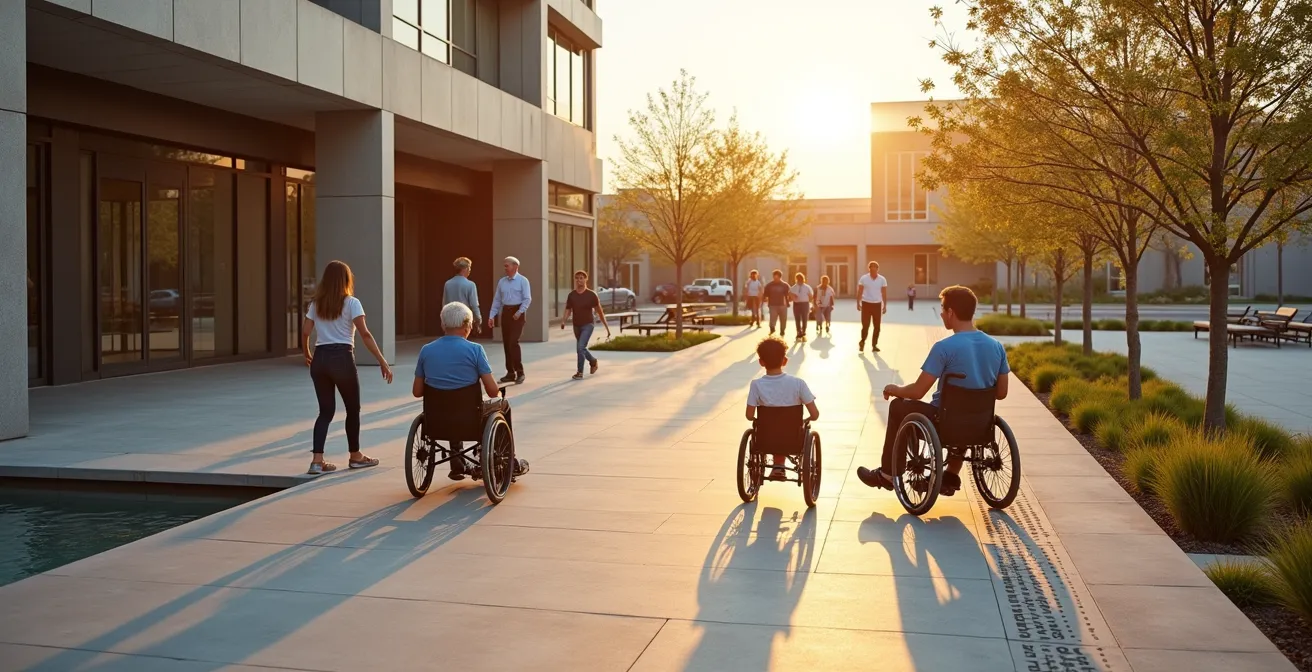
This image powerfully illustrates the physical reality of what we, as designers, often only see as a gradient on a blueprint. The strain is real. A design that forces this level of exertion for basic access effectively filters out users who lack the required upper-body strength. True accessibility requires us to design the path of least resistance, which means considering not just the slope, but the total length, the presence of level landings for rest, and the proximity to other features. The goal is to ensure a user arrives at their destination with energy to spare, ready to participate, not exhausted from the journey.
The door handle mistake that excludes 20% of the population
After navigating a ramp, the next common barrier is the door. A simple round doorknob, while seemingly innocuous, can be an insurmountable obstacle for a significant portion of the population. Individuals with arthritis, limited hand strength, or wrist mobility issues cannot effectively grip and turn a knob. This single design choice, often made for aesthetic or cost reasons, immediately excludes them. This is not a niche problem; in the United States, for example, approximately 26% of adults live with a disability, a large percentage of whom face challenges with manual dexterity.
The solution is the lever-style handle. It can be operated with a closed fist, an elbow, or the side of the hand, requiring minimal grip strength or fine motor control. This is a classic example of Universal Design: a solution that makes the environment more usable for people with disabilities also benefits everyone else—parents carrying children, workers moving carts, or anyone with their hands full. Yet, the mistake of specifying knob-style handles in public and commercial spaces persists.
Beyond the handle itself, we must consider the door’s weight and closing mechanism. A heavy, non-powered door, even with a lever handle, presents another significant drain on the user’s energy budget. It requires the user to pull or push with considerable force while simultaneously maneuvering their wheelchair. The ideal solution is a properly calibrated automatic door opener with a clearly marked push plate. This eliminates the physical barrier entirely and signals a genuine welcome, rather than presenting another test of strength. The choice of door hardware is a micro-decision with macro-level implications for inclusion.
Elevator vs. Platform Lift: Which solution offers better ROI for small venues?
For multi-level access in smaller buildings, planners often face a choice between a full passenger elevator and a vertical platform lift (VPL). The decision is frequently driven by initial cost, but a true Return on Investment (ROI) analysis must extend to user experience, operational efficiency, and brand perception. A VPL is significantly cheaper upfront, but it sends a different message. It is often slower, has a smaller capacity, and can feel like a segregated, compliance-focused solution rather than an integrated part of the building’s circulation.
An elevator, while a larger capital investment, offers superior throughput, accommodates multiple users and groups, and feels more dignified. It represents a commitment to participation vs. presence. The choice impacts not just wheelchair users but also parents with strollers, delivery personnel, and elderly visitors. A slow VPL can create bottlenecks and frustration for all, whereas an efficient elevator enhances the flow and experience for everyone.
The following table breaks down the key factors in this decision, moving beyond simple sticker price to a more holistic view of value. As this comparative cost-benefit analysis shows, the long-term value proposition can be complex.
| Factor | Elevator | Platform Lift |
|---|---|---|
| Initial Cost | $20,000-$50,000 | $5,000-$15,000 |
| Installation Time | 4-8 weeks | 1-2 weeks |
| Annual Maintenance | $3,000-$5,000 | $500-$1,500 |
| User Capacity | Multiple users | Single user + aide |
| Speed/Throughput | Fast (30 sec/floor) | Slow (2-3 min/floor) |
| Brand Perception | Premium, inclusive | Basic compliance |
Ultimately, the “better” ROI depends on the venue’s goals. For a boutique hotel or a high-end retail space, the superior brand perception and user experience of an elevator may provide a far greater return in customer loyalty and brand equity. For a small community hall with very limited traffic and budget, a VPL may be the only feasible option. The critical takeaway is to make this decision consciously, understanding all the trade-offs, rather than defaulting to the cheapest option.
How audio beacons assist visually impaired visitors in complex transit hubs?
Large, complex spaces like transit hubs, airports, and university campuses present a significant navigational challenge for visually impaired individuals. Traditional signage is ineffective, and the ambient noise can make it difficult to ask for or hear directions. This is where the cognitive side of the energy budget comes into play. The stress and mental effort required to navigate an unfamiliar and confusing environment can be just as exhausting as physical exertion. Audio beacons offer a powerful technological solution to this problem.
An audio beacon is a small, low-energy transmitter. Using a smartphone app, a visually impaired user can detect these beacons as they move through a space. The app provides them with precise, contextual information, such as “You are now approaching the entrance to Platform 3; the ticket counter is 20 feet to your right,” or “The accessible restroom is directly ahead.” This technology transforms a journey of uncertainty and high cognitive load into a clear, guided experience. It’s the auditory equivalent of a “You Are Here” map that updates in real-time.
The implementation of audio beacon systems requires a strategic approach. Beacons must be placed at key decision points: intersections of corridors, entrances, information desks, and amenities. The information they transmit must be concise, accurate, and consistent. Critically, the system must be part of a larger wayfinding strategy that might also include tactile paving, high-contrast signage, and well-trained staff. No single solution is a panacea; they work together as a resilient network of navigational cues. By reducing the cognitive load of wayfinding, audio beacons free up a user’s mental energy to focus on the purpose of their trip, rather than the process of getting there.
When to audit your evacuation plan for mobility-impaired safety?
A building’s evacuation plan is its ultimate life-safety feature, but it is often designed with an able-bodied user as the default. For individuals with mobility impairments, a standard “use the stairs” fire drill is not just impractical; it’s a catastrophic failure of planning. Elevators are typically shut down during an emergency, leaving wheelchair users and others stranded. Auditing an evacuation plan for mobility-impaired safety cannot be a one-time event. It must be a dynamic process, triggered by specific changes in the building’s use and layout.
Static plans become obsolete the moment a floor plan is altered, or the building’s occupant demographics change. The concept of “Areas of Refuge”—designated spaces, often near stairwells, where individuals can wait for rescue—is a critical component. However, these areas are useless without a robust, regularly tested two-way communication system and a clear plan for emergency responders to access them. The audit must go beyond the blueprint to test the system’s real-world functionality and the staff’s training on how to execute it.
Barrier-free design ensures that people with disabilities can navigate the world and pursue their goals like anyone else. This basic right makes a huge difference. Without accessible spaces, people with disabilities could struggle to work, care for themselves, transport themselves, and even enjoy time out on the town.
– NeuroNav, What is Barrier-Free Design?
This philosophy extends to the most critical moments. Ensuring a person can enjoy “time out on the town” also means ensuring they can get out safely. The following checklist provides a framework for a dynamic audit process, shifting from a static document to a living safety protocol.
Action Plan: Dynamic Evacuation Safety Audit
- Review Points of Contact: Inventory all evacuation signage, alarm systems (visual and audible), and two-way communication devices in Areas of Refuge. Verify their functionality annually.
- Collect and Map Resources: Maintain a current inventory of all evacuation chairs, their locations, and the staff trained to use them. Verify locations quarterly after any floor plan changes.
- Assess for Coherence: Cross-reference the evacuation plan against any changes in the building’s layout, use, or the known population of occupants with mobility needs. Does the plan still work?
- Evaluate Human Factors: Audit the effectiveness of staff training. Use real-world incidents, including false alarms, as opportunities for “lessons learned” debriefs to improve response and communication under stress.
- Establish an Integration Plan: Create a formal schedule for drills that specifically test the mobility-impaired evacuation procedures. Immediately integrate any findings from audits or incidents into an updated plan.
Why your sneakers are more dangerous to mosaics than weather erosion?
In heritage preservation, a fascinating principle emerges: the greatest threat to an ancient floor mosaic is often not a dramatic, singular event like a flood, but the cumulative friction of millions of soft-soled shoes. Each footstep imparts a minuscule amount of abrasion. A single sneaker does no harm, but over decades, the collective effect can erase a priceless work of art. Weather erosion, while powerful, is intermittent. Foot traffic is constant.
This principle serves as a powerful metaphor for accessible design. As designers, we often focus on eliminating the big, obvious barriers—the “weather events” like a flight of stairs. We replace it with a ramp and consider the job done. However, we often fail to see the “sneakers”: the series of small, seemingly insignificant frictions that we leave in the design. A door that’s slightly too heavy. A ramp that is compliant but uncomfortably long. A pathway surface that causes just a little too much vibration. An information desk that is five inches too high.
Individually, each of these is a minor inconvenience. Collectively, they are the micro-abrasions that wear down a wheelchair user’s energy budget. By the time they have navigated a gauntlet of these small frictions, their capacity for engagement is gone. They are, in effect, erased from meaningful participation in the space. The danger isn’t the single, obvious barrier we removed; it’s the dozen smaller ones we didn’t even notice. Our job is to design for the total experience, smoothing out the entire path, not just fixing the most obvious crack.
How to locate “touch-allowed” sections in strict fine art museums?
The traditional museum experience is overwhelmingly visual. The “do not touch” rule is paramount. This creates a sterile, hands-off environment that inherently excludes visitors who are blind or have low vision, and offers a limited sensory experience for everyone else. Achieving participation vs. presence in a cultural space requires designing for a wider range of sensory engagement. The location of “touch-allowed” sections is a key part of this, but it must be integrated into a clear and intuitive wayfinding system.
Simply having a tactile sculpture in a corner is not enough; visitors need to know it’s there and be given explicit permission to interact with it. The solution lies in multi-modal communication. Wayfinding for these sections should begin at the museum entrance. A tactile map of the museum, available at the information desk, can use raised textures to indicate galleries with touchable objects. Audio guides or smartphone apps (utilizing the audio beacon technology discussed earlier) can announce, “In this gallery, the bronze sculpture to your left is available for tactile exploration.”
Signage is also critical. A universally recognized symbol for “touch is welcome” can be placed next to designated objects, accompanied by Braille and large-print text. The design of these touchable exhibits themselves matters. They should be robust and placed at a height accessible to both standing visitors and wheelchair users. By creating a clear, multi-sensory system that guides visitors to these interactive opportunities, museums can transform from passive viewing spaces into active, engaging environments for a much broader audience.
Key Takeaways
- Compliance is the floor, not the ceiling. True accessibility is measured by a user’s ability to participate, not just their ability to be present.
- Design every journey path with the user’s finite ‘energy budget’ in mind. Minimize cumulative friction from small, compliant obstacles.
- The best accessibility solutions are often invisible, integrated into the primary ‘path of least resistance’ and benefiting a wide range of users.
How to Furnish a 300 sq ft Studio with Modular Furniture for Max Space?
While seemingly unrelated, the principles of furnishing a tiny 300-square-foot studio apartment offer surprisingly relevant lessons for designing inclusive public spaces. The challenge in a micro-apartment is the same as in a small cafe, a waiting room, or a library nook: maximizing utility, ensuring clear circulation, and creating a sense of openness within a constrained footprint. The core principle is efficiency of space, and this is directly applicable to accessibility.
In a small studio, every piece of furniture must be deliberate. Modular sofas can be reconfigured, tables can be nested or wall-mounted, and storage is vertical. This mindset is critical for accessibility. In a small public venue, bulky, fixed furniture can create impassable barriers for a wheelchair user. The solution is to think modularly. Use lighter, movable chairs and tables that can be easily rearranged. Ensure that at least some tables are pedestal-style to allow a wheelchair user to pull up close without a table leg blocking their way. Keep primary circulation paths wide and clear at all times, just as you would from the door to the bed in a studio.
The concept of multi-functionality is also key. A low coffee table in a waiting room might be an aesthetic choice, but it’s a barrier. A higher-profile end table placed next to a chair is both a surface for a drink and out of the main path of travel. By applying the rigorous spatial logic of micro-living to public areas, we can create spaces that feel more generous, operate more efficiently, and, most importantly, include everyone, regardless of the square footage.
Start by auditing one key journey path in your current project—from the parking lot to a specific destination within the building—not for compliance, but for its cumulative energy cost. Identify every door, ramp, surface change, and navigational ambiguity, and ask: “How much physical and cognitive effort does this demand?” That is the first step toward designing for true inclusion.